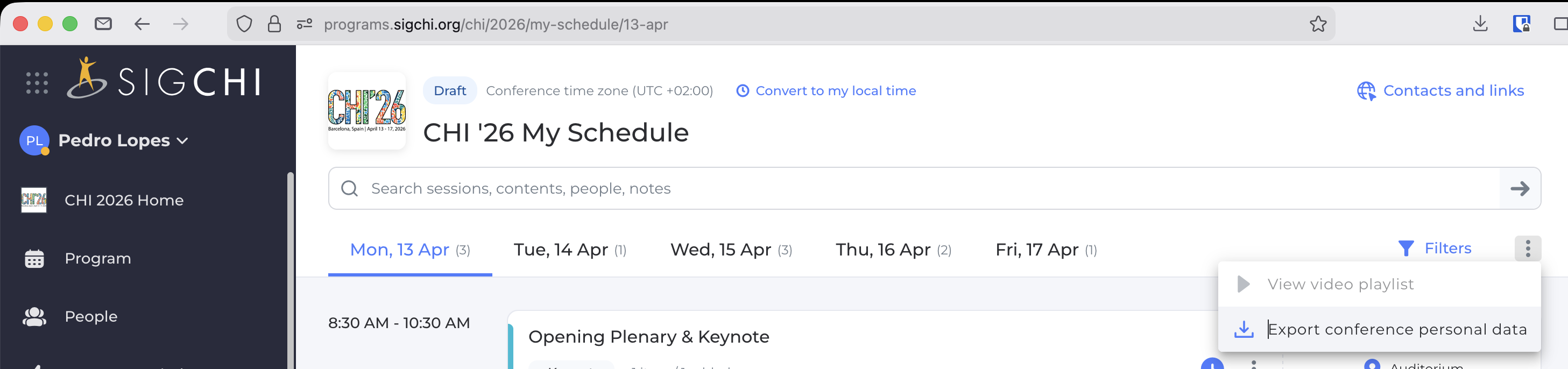
Go to your conference's program in the SIGCHI app (e.g., this one). Make sure you login (critical step!). Now you can add sessions to your "schedule" by clicking the "schedule" icon. When done and ready to convert to google calendar, click "Export conference personal data" inside the "hamburger" menu on the top-right corner (as shown in the Figure below). This will download a .csv that you can drag and drop or import below, to convert to a ".ics" for your Google calendar import.
.ics file.ics fileFiles uploaded to server for conversion, then kept in server for one hour (purged automatically via cronjob). If you prefer to run this locally, you can run this python script (i.e., this is the same script this server is running).
This is not an official app from SIGCHI. This is a script for conference attendance purposes, created by Pedro Lopes for personal use (and for lab-use). Please use at your own risk. If you have suggestions, email them to Pedro Lopes.)